Too many separate accounts
A personal address, a family one, a shopping one — each with its own inbox to check and its own clutter.
For multiple personal email accounts
Personal messages, shopping receipts, subscriptions, renewals and everyday correspondence don't need to live in separate, overflowing inboxes.
Launching soon — register your interest for early access.
A personal address, a family one, a shopping one — each with its own inbox to check and its own clutter.
Renewal notices and receipts are scattered across conversations and accounts, easy to miss until the money's gone.
A school notice or a delivery update competes with newsletters and promotions in the same overflowing list.
Unsubscribing and clearing out old conversations one at a time is repetitive enough that it never quite happens.
One list for every account
Bring Gmail, Outlook and other IMAP accounts together — or focus on just one when you want quiet.
The important stuff floats up
AI labels eligible email as Needs action or Info with short summaries, so real messages stand out from noise.
Subscriptions you can actually leave
See subscription senders together, unsubscribe and clean up the associated email in one go.
Payments and renewals at a glance
Receipts, payment and renewal details mentioned in your email are picked out and listed in one place.
Tidy once, stay tidy
File older conversations under your own labels and keep anything pending in Tasked.
Important emails become tasks
Turn the things you mustn't forget — an appointment follow-up, a renewal to check, an admin request — into tasks with notes and statuses, and track them in your Tasks view.
See it all add up
The Dashboard shows your current inbox and task totals and how your email activity is changing, for today, this week or this month.
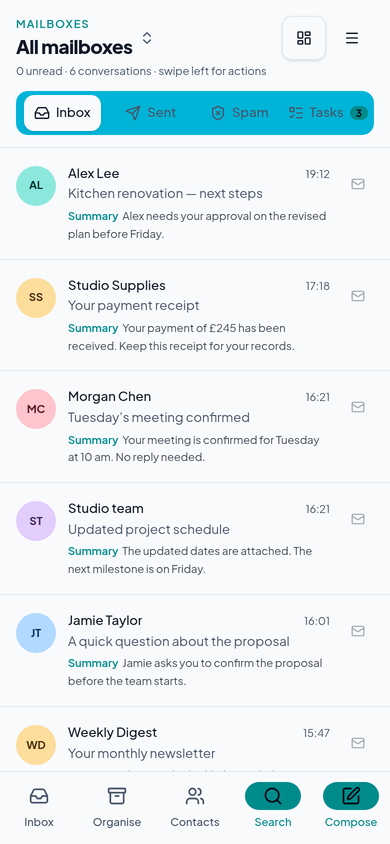
Connect your personal, shopping and other accounts. Everything arrives in one inbox, clearly marked by mailbox.
Recent important correspondence is easier to spot, with summaries and Needs action labels doing the sorting.
Unwanted subscriptions are identified so you can unsubscribe and remove their email in one go.
Open Payments & renewals to see what you're paying for and what's coming up.
Older conversations move into Filed under your own categories — out of the inbox, never deleted.
Check everything once a day from your phone instead of four times per app. One tap switches mailbox focus, your Tasks view and Dashboard come with you, and notifications are configurable per account — all new email, or Needs attention only.
Open mobile appA natural fit
Teams supports two users and four connected email accounts and includes the standard CommsRadar functionality — unified inbox, AI summaries, Filed and Tasked, subscription cleanup and payment insights.
See full plan detailsA little more clarity
Gmail, Outlook (Microsoft 365 or Outlook.com) and other providers using IMAP and SMTP. Your existing addresses stay exactly the same.
Yes. Choose all mailboxes for a combined inbox, one mailbox when you want focus, or several together. Every email shows which mailbox it belongs to.
CommsRadar identifies subscription senders in your email so you can unsubscribe and remove the associated conversations in one go, instead of hunting them down one by one.
Teams (€19/month) supports two users and four connected email accounts with every CommsRadar feature. Need another mailbox? Each Expansion (+€10/month) adds one user, one account and more AI actions.
CommsRadar is launching soon. Register your interest and we'll be in touch.
Launching soon — register your interest for early access.